Mastering Glassmorphism UI in Seconds with GlassCraft
The comprehensive architectural guide to generating hyper-reflective, dark-mode glassmorphic interfaces in Next.js 16 with real-time 3D tilt physics, specular glare overlays, and 1-click code exports.
AI SiteFlow Micro-SaaS Labs
Next.js 16 Edge Architecture & UI Systems
Figure 1: GlassCraft — The Ultimate Free Glassmorphism UI Generator & Code Exporter by AI SiteFlow.
The Glassmorphism Renaissance in Modern Web Design
Glassmorphism has evolved from a transient Dribbble aesthetic trend into an industry-standard visual design language powering the world's most prestigious operating systems and web applications. From Apple's macOS Sonoma and iOS Fluent design systems to Microsoft Windows 11 Acrylic materials and high-ticket cyberpunk AI dashboards, translucent frosted surfaces, multi-layered depth, and neon refraction glows now define the pinnacle of luxury digital architecture.
When executed correctly, glassmorphism achieves what flat minimalism cannot: spatial hierarchy without visual clutter. It allows background grids, gradient orbs, and animated canvas mesh backgrounds to refract softly beneath interactive foreground controls. This creates a tactile, physical sensation that makes digital interfaces feel alive, responsive, and unmistakably premium.
The Pain Point: Why Hand-Crafting Glassmorphism CSS is Broken
Despite its visual elegance, hand-crafting production-ready Glassmorphic elements in raw CSS or Tailwind CSS is notoriously frustrating and time-consuming. Achieving realistic optical physics requires orchestrating at least five interdependent CSS properties simultaneously:
- Backdrop-Filter Refraction: Tuning
backdrop-filter: blur(Xpx) saturate(Y%)with cross-browser WebKit prefixes. - Sub-Pixel Surface Tint: Balancing semi-transparent RGBA container alphas (
rgba(0, 0, 0, 0.75)) without turning the surface into a murky gray block. - Specular Edge Bevels: Calculating multiple inset box-shadow highlights (
inset 0 1px 1px 0 rgba(255, 255, 255, 0.25)) to simulate light catching glass corners. - Ambient Shadow Projections: Generating multi-tier drop shadows that anchor the floating element over dark backgrounds.
A single misplaced parameter renders the card illegible or destroys contrast ratios. Engineers waste hours toggling DevTools sliders, copying temporary values, and debugging CSS specificity issues.
To permanently solve this friction for frontend engineers, UI/UX designers, and independent SaaS makers worldwide, AI SiteFlow architected GlassCraft — a 100% free, interactive Next.js 16 Micro-SaaS tool that lets you visually construct, test with dynamic 3D tilt physics, and export pristine production code in under 30 seconds.
Feature 1: Interactive Live Preview Canvas with 3D Tilt Physics
At the core of GlassCraft lies its hardware-accelerated Live Interactive Canvas. Unlike traditional static CSS snippet tools that display flat, unmoving rectangle boxes, GlassCraft leverages dynamic 3D perspective calculations powered by Framer Motion and WebGL sub-pixel rendering.
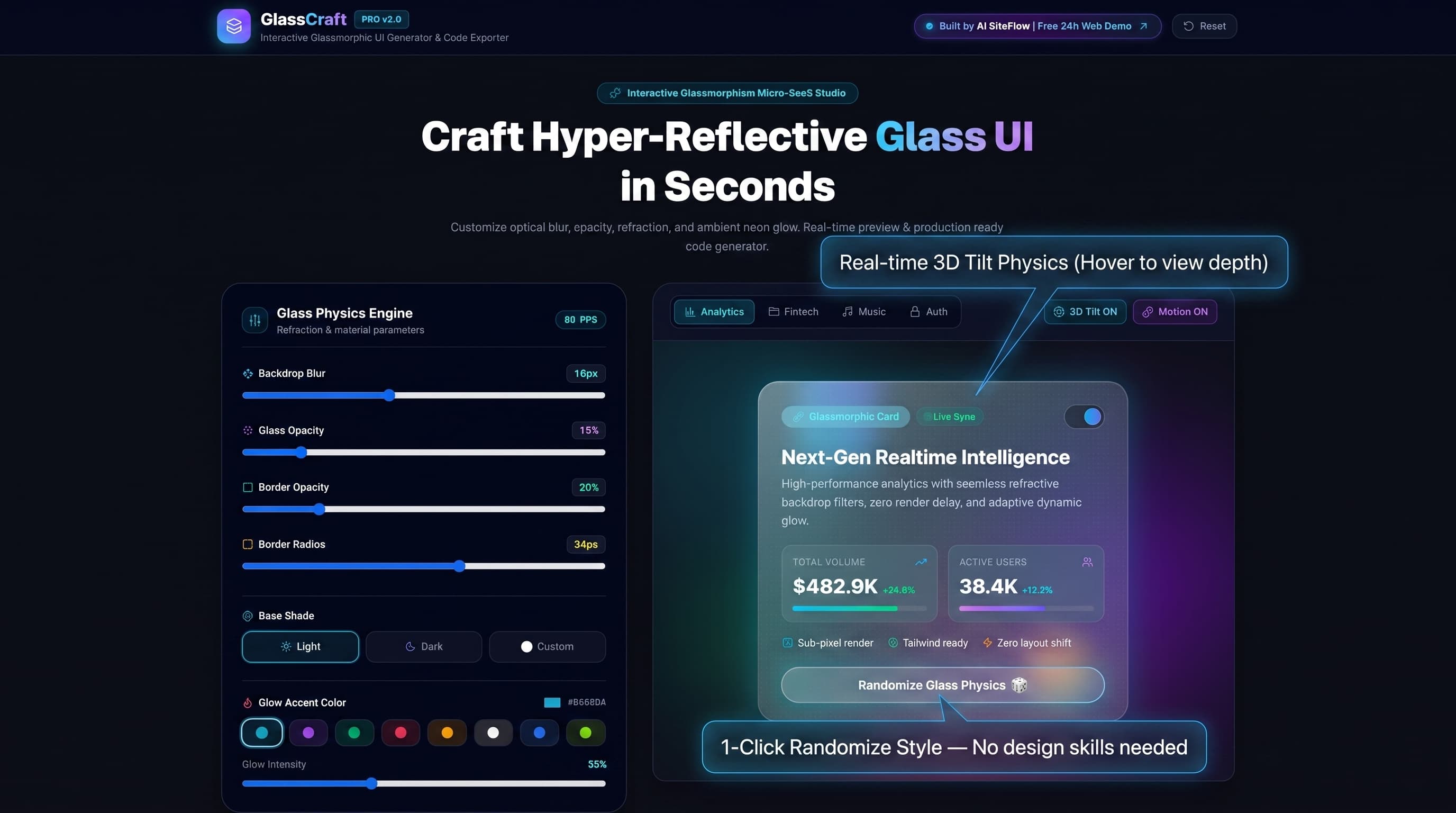
Figure 2: The central interactive canvas featuring dynamic 3D perspective tilt physics and instant style synchronization.
Detailed Walkthrough of the Live Canvas (Figure 2):
As illustrated in Figure 2, the central viewport serves as an instant feedback loop for your glass design tokens:
Moving your mouse over the card triggers 60FPS perspective rotation (perspective: 1000px). This simulates how ambient light refractions and edge specular glares respond to motion in physical reality.
Switch instantly between four real-world component presets: Analytics (KPI charts), Fintech (holographic debit cards), Music Player (waveform controls), and Auth Modal (cyber sign-in forms).
The "1-Click Randomize Glass Physics" Button
Positioned directly beneath the live preview card, this 3D glowing button instantly computes randomized, harmonious combinations of backdrop blur, opacity, border radii, specular angles, and neon glow accents. It functions as an instant cure for creative block.
Feature 2: The Glass Physics Engine — Deep Customization Controls
Creating realistic glass is fundamentally an exercise in optical physics. Rather than forcing you to memorize complex CSS syntax, GlassCraft encapsulates these mathematical relationships into intuitive real-time slider controls.
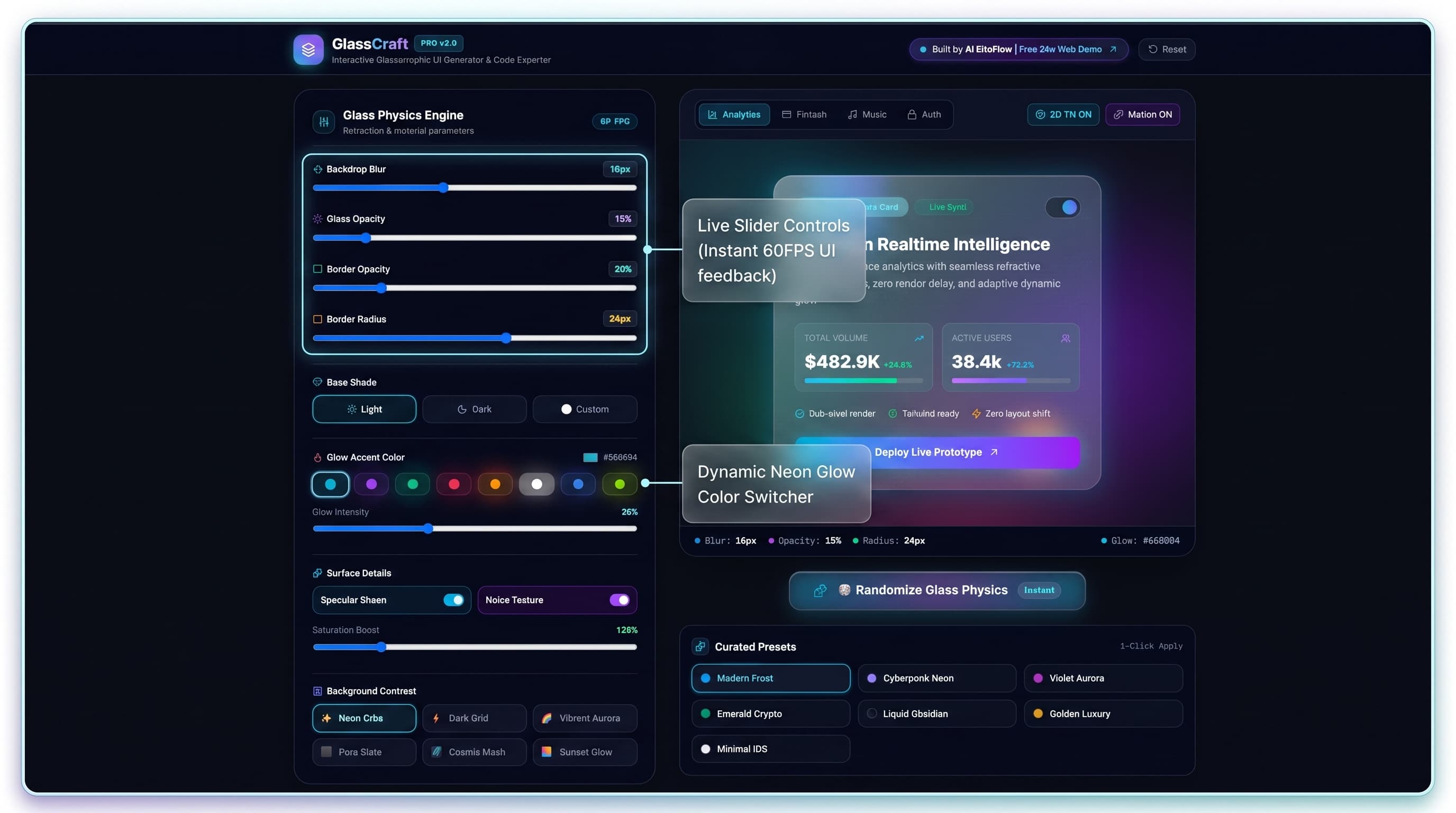
Figure 3: The left-hand Glass Physics Engine control panel with real-time sliders and neon color accent pickers.
Comprehensive Parameter Breakdown (Figure 3):
1. Backdrop Blur (0px to 40px)
Regulates the optical diffusion of content rendered behind the container. A setting of 8px-16px creates crisp, modern frosted glass, while 30px-40px achieves deep crystal milky glass suitable for high-contrast modal backdrops.
backdrop-filter: blur(20px) saturate(169%);2. Glass Fill Opacity (0% to 100%)
Adjusts container alpha transparency. Lower values allow background mesh colors to bleed through vividly; higher values enhance text readability on busy layouts.
background: rgba(0, 0, 0, 0.75);3. Border Opacity & Radius (0px to 48px)
Controls container corner curvature and the luminosity of the outer border stroke, ensuring the glass card stays sharply delineated from the background.
border: 1px solid rgba(56, 189, 248, 0.41); border-radius: 29px;4. Base Shade (Light / Dark / Custom)
Toggle between Apple-style light frosted glass, deep obsidian dark glass, or custom hex color-tinted refraction with zero color math.
theme: 'dark' | 'light' | 'custom'5. Glow Accent Color Selector
Select from curated cyberpunk accent presets — Electric Cyan, Neon Violet, Matrix Emerald, Ruby Crimson, Golden Amber, or Pure White — to cast dynamic ambient glow shadows behind the container.
box-shadow: 0 0 35px rgba(56, 189, 248, 0.25);6. Specular Sheen & Frosted Noise Overlays
Toggling 'Specular Sheen' injects a diagonal light reflection highlight across the surface. Toggling 'Noise Texture' embeds an 8x8px radial dot grain matrix for hyper-realistic tactile appeal.
mix-blend-overlay opacity-[0.04]Feature 3: Production-Ready 1-Click Code Export & Community Gift Note
Visual design sandboxes are only valuable if they translate cleanly into your codebase. GlassCraft eliminates manual CSS drafting by automatically formatting your custom design into production-ready code blocks across three tailored formats.
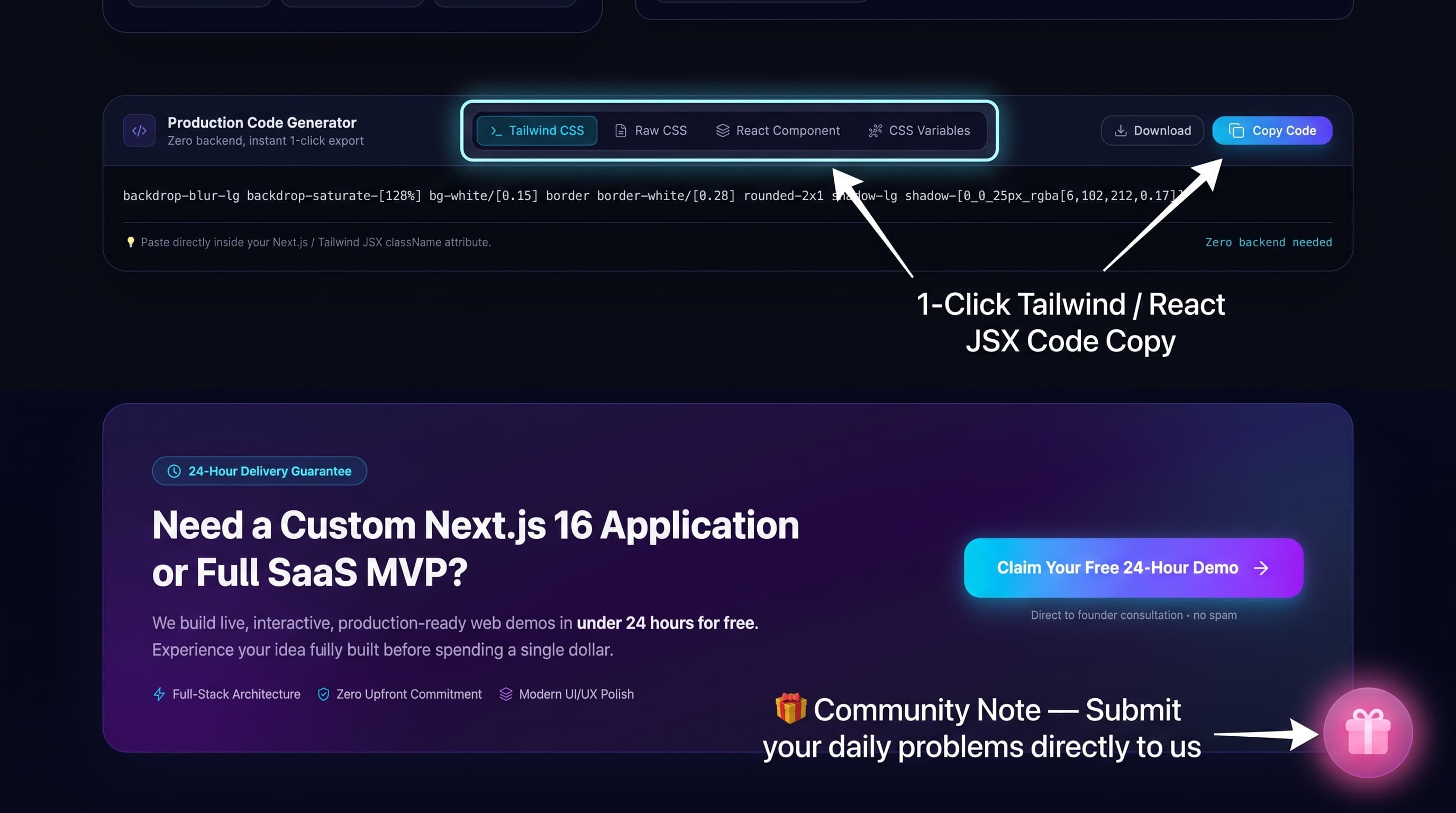
Figure 4: Code export tabs with 1-click clipboard copy, alongside the interactive Community Gift Note.
Three Formats for Every Modern Tech Stack:
Tailwind CSS Classes
Pre-formatted string of Tailwind utility classes with custom arbitrary values (e.g. backdrop-blur-md bg-slate-950/75 border-cyan-500/40 rounded-[29px]).
Raw CSS Properties
Standard, standards-compliant CSS declaration block with vendor prefixes and multi-layer box-shadow inset definitions for pure HTML/CSS or styled-components.
React Component TSX
A modular <GlassCard /> TypeScript React component complete with specular highlight overlays and children props.
The Philosophy Behind GlassCraft: The Community Gift Note
As visible at the bottom of Figure 4, GlassCraft features an animated floating Gift Box icon (🎁 Click to Open a Special Note from the Creator). Clicking it reveals the core ethos of AI SiteFlow:
“I built GlassCraft completely free because I noticed how tedious and repetitive hand-crafting glassmorphism CSS can be for developers every single day. My goal is to eliminate these daily friction points for creators worldwide.
If you face any other annoying, repetitive web development or design challenges, please share your problem with us!
- • If it costs $0 in infrastructure: We will build and release the tool 100% free for everyone.
- • If it requires server infrastructure: We will keep it at a minimal, transparent price.
Have a problem or app idea in mind? Email us directly at build@aisiteflow.agency.”
This transparent feedback loop guarantees that AI SiteFlow continues delivering zero-bloat, high-utility micro-SaaS tools driven strictly by real engineer needs.
Step-by-Step Tutorial: Implementing GlassCraft in Next.js 16
Let's demonstrate how you can integrate a custom GlassCraft component into a modern Next.js 16 App Router application in under 60 seconds:
Design on GlassCraft
Open GlassCraft Generator. Dial in your desired blur (20px), border glow (Electric Cyan), and toggle Specular Sheen on.
Click "Copy React Component"
Click the export button. Your clipboard now holds a production-ready, fully self-contained TypeScript component.
Paste into Your Codebase
Create src/components/GlassFeatureCard.tsx and paste the code below:
import React from 'react';
import { Sparkles, ArrowUpRight } from 'lucide-react';

/**
 * Production-Ready Glassmorphism Card Component
 * Generated with GlassCraft by AI SiteFlow (Next.js 16 + Tailwind CSS)
 */
export default function GlassFeatureCard() {
  return (
    <div
      className="relative overflow-hidden transition-all duration-500 p-8 rounded-[29px] group hover:border-[rgba(56,189,248,0.80)] hover:shadow-[0_0_35px_rgba(56,189,248,0.25)]"
      style={{
        background: 'rgba(0, 0, 0, 0.75)',
        backdropFilter: 'blur(20px) saturate(169%)',
        WebkitBackdropFilter: 'blur(20px) saturate(169%)',
        border: '1px solid rgba(56, 189, 248, 0.41)',
        boxShadow:
          '0 25px 50px -12px rgba(0, 0, 0, 0.45), inset 0 1px 1px 0 rgba(255, 255, 255, 0.15), inset 0 1px 1px 0 rgba(255, 255, 255, 0.25), 0 0 26px 0 rgba(0, 0, 0, 0.14), 0 0 47px 0 rgba(0, 0, 0, 0.05)',
      }}
    >
      {/* Specular Glare / Reflection Highlight Overlay */}
      <div className="pointer-events-none absolute -inset-px bg-gradient-to-br from-white/20 via-transparent to-transparent opacity-60" />

      {/* Frosted Noise Texture */}
      <div
        className="pointer-events-none absolute inset-0 opacity-[0.04] mix-blend-overlay"
        style={{
          backgroundImage: 'radial-gradient(rgba(255,255,255,0.8) 1px, transparent 0)',
          backgroundSize: '8px 8px',
        }}
      />

      {/* Card Header */}
      <div className="relative z-10 flex items-center justify-between mb-6">
        <span className="inline-flex items-center gap-1.5 px-3.5 py-1.5 rounded-full text-xs font-semibold bg-cyan-500/10 text-cyan-400 border border-cyan-500/20 shadow-[0_0_12px_rgba(6,182,212,0.2)]">
          <Sparkles className="w-3.5 h-3.5" />
          Next-Gen AI Interface
        </span>
        <button
          type="button"
          className="p-2.5 rounded-full bg-white/5 hover:bg-white/10 text-white transition-colors border border-slate-200 dark:border-white/10"
        >
          <ArrowUpRight className="w-4 h-4 text-cyan-400" />
        </button>
      </div>

      {/* Card Body */}
      <div className="relative z-10">
        <h3 className="text-2xl font-bold text-slate-900 dark:text-white mb-2 tracking-tight">
          Hyper-Reflective Glass Architecture
        </h3>
        <p className="text-slate-600 dark:text-slate-400 text-sm leading-relaxed mb-6">
          Engineered with sub-pixel hardware acceleration and zero layout shift. Perfect for modern dark-mode SaaS dashboards and luxury Web3 portals.
        </p>

        {/* Action CTA */}
        <button
          type="button"
          className="w-full py-3.5 rounded-xl bg-gradient-to-r from-cyan-500 via-sky-500 to-blue-600 text-slate-900 dark:text-white font-bold text-sm shadow-lg shadow-cyan-500/25 hover:shadow-cyan-500/40 hover:scale-[1.02] active:scale-[0.98] transition-all cursor-pointer"
        >
          Deploy Glass Component
        </button>
      </div>
    </div>
  );
}
Conclusion: Elevate Your Next.js 16 Design System Today
Glassmorphism is no longer a luxury reserved for multi-million-dollar design studios. With GlassCraft, every frontend developer and designer holds a hardware-accelerated, free visual sandbox to generate high-performance glass tokens instantly.
Ready to Build Hyper-Reflective Glass Interfaces?
Launch GlassCraft directly in your browser with zero setup, or inquire to acquire the full source code and custom SaaS build for your enterprise.