Google Veo 4 Release Date (2026): Omni Flash vs Veo 3.1
Is Google Veo 4 coming in 2026, or will Gemini Omni Flash take its place? If you have seen videos claiming a release date, a secret successor, or a cancellation, here is the key fact: as of October 19, 2026, Google has not officially announced a video model named Veo 4. The absence of an announcement is not proof that Veo 4 will never exist. This independently researched guide separates official product information from speculation, explains what creators can use today, and shows how to plan AI-powered commercial work without waiting for an unconfirmed tool.
Google Veo 4 release date: the short answer
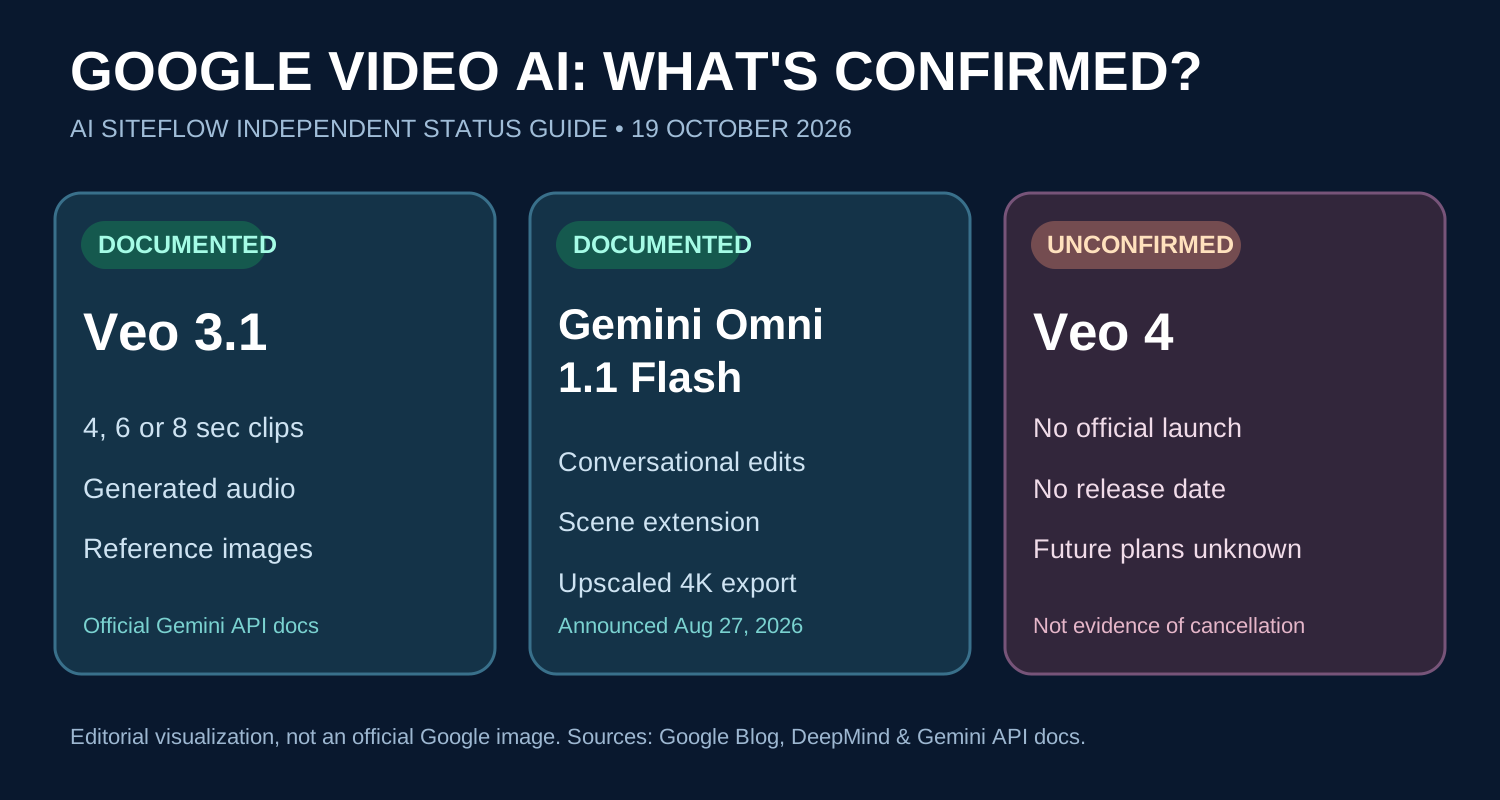
There is no confirmed Veo 4 launch date, official price list, or publicly announced feature specification in the Google sources reviewed for this article. A predicted month in a social media post is not a product announcement. Likewise, claims that a differently named tool has definitively replaced Veo 4 go beyond the evidence. Google has documented both the Veo family and the newer Gemini Omni creative-video family; the sensible approach is to examine each published product on its own terms.
For the fastest fact check, start with Google's Veo developer documentation and the official Omni 1.1 Flash announcement. These are more reliable than a thumbnail with a speculative date.
Timeline: what Google has actually announced in 2026
At Google I/O on May 19, 2026, Google introduced Gemini Omni and described video creation and editing as its starting point. That is an important development, but introducing a new family is not the same thing as officially discontinuing an existing one. On August 27, Google announced Gemini Omni 1.1 Flash, with more granular creative controls for developers and creators. Its published capabilities include scene extension, start-and-end-frame interpolation, rapid low-resolution drafts and upscaled high-resolution output.
Meanwhile, Google's Gemini API documentation continues to describe Veo 3.1 and its variants. The practical news is therefore not that an imaginary Veo 4 has arrived, but that creators have multiple documented workflows to compare. Product availability and feature support can change, so verify the particular account, region, model identifier and platform before promising a delivery method to a client.
What is Veo 3.1, and what can it do?
Veo 3.1 is a Google video-generation model available through the Gemini API. According to the current official documentation, supported generation durations can include 4, 6 and 8 seconds, depending on model and settings. Google documents native audio generation, landscape and portrait formats, image-to-video guidance, and the ability to define first and last frames. Developers can also use reference images in supported modes, which is useful when a scene needs a particular product or visual direction.
There are meaningful restrictions. Higher resolutions such as 1080p and 4K have duration limitations; reference-image and extension workflows also have special requirements. Video extension is not the same as an unlimited-length video export, and the API restricts which generated videos can be extended. If your project needs a specific 4K output, several references, an exact runtime or stable audio, consult the parameter table before building the storyboard. Read the Veo 3.1 capabilities and limitations rather than assuming every demo feature works in every mode.
What is Gemini Omni 1.1 Flash?
Gemini Omni 1.1 Flash is a separate Google model update focused on controllable creation and editing. Google's August announcement describes the ability to extend scenes in 10-second increments up to 40 seconds of cumulative length, using more previous-scene context to guide continuation. The model supports specifying opening and ending frames to guide a continuous transition, which can be useful for camera moves or carefully staged visual changes. Google also describes 360p draft generation for faster iteration and lower-cost exploration before final output.
Google promotes polished 1080p and upscaled 4K output. The word “upscaled” matters: it should not automatically be described as native 4K generation. Availability spans documented Google creative and developer surfaces, but the options shown in one interface may differ from those in another. The proper way to evaluate the model is to test your own production constraints—motion, audio, continuity, identity, logos and delivery resolution—using the current controls.
Veo 3.1 vs Gemini Omni 1.1 Flash: practical comparison
| Question | Veo 3.1 | Gemini Omni 1.1 Flash |
|---|---|---|
| Officially documented? | Yes, Gemini API model family | Yes, August 2026 Google announcement |
| Core emphasis | Generate short video clips with audio and guided input | Control, extend and edit generated video |
| Duration information | 4, 6 or 8 seconds for supported generation modes | 10-second extensions, up to 40 seconds cumulative |
| Creative guidance | Reference images and first/last frames in supported modes | Start/end frames and longer-context scene continuation |
| Resolution information | Up to 4K in supported 8-second modes | 1080p and upscaled 4K output |
| What needs checking? | Model variant, duration, extensions and API restrictions | Access surface, credit cost, output and export options |
This is an editorial feature comparison, not a claim that one model wins every benchmark. Google has not provided an official head-to-head ranking for the specific business use cases discussed here. A filmmaker who values fresh eight-second shots might make a different choice from an editor who wants to continue an established scene.
Did Gemini Omni replace Veo 4?
There is no verified basis for saying Omni 1.1 Flash “replaced Veo 4,” because a Veo 4 product was not officially announced in the sources reviewed. A comparison between Omni and Veo 3.1 is useful because both are real, documented products. A comparison between Omni and alleged Veo 4 specifications would be guesswork. Brand names and internal development plans can change, and Google might announce different models or versions in the future; we should not present any particular outcome as settled.
For buyers, this distinction protects time and money. Do not purchase a subscription based on a rumor about a future model. Check which current tools are accessible in your country, whether commercial usage is allowed under the applicable terms, and whether the tool handles your exact aspect ratio and audio requirements.
What about “Gemini Omni Flash Pro” or “Omni Flash 2”?
Those phrases are sometimes used in predictions about future AI video releases, but there is no confirmed official launch of products under those exact names in the referenced Google announcements as of this article's review date. Predicting a successor based on the name of a current model is not research. A responsible guide should distinguish a hypothesis from a public roadmap, and it should update readers when evidence changes rather than silently rewriting yesterday's prediction as a fact.
If you see a supposed product screenshot, check whether it appears on an official Google domain and whether Google itself links to the page. Even an authentic-looking interface does not prove that pricing, release timing or country access is finalized.
Where can you use Google's AI video tools?
Google's Flow announcement describes Omni 1.1 creative controls in Flow, while the developer announcement discusses Google AI Studio and enterprise developer access. Google also documents Veo through the Gemini API. These routes serve different needs: an individual creative editor may prefer a visual interface; a developer may want API access for a reproducible production pipeline.
Do not assume that having a Gemini subscription, an API key or a Flow account automatically unlocks every feature. Permissions, pricing, credits, supported locations and model availability are separate questions. Open the current product page, sign in to an account you control, inspect the model selector and read the associated terms before preparing a client quote.
How to create a 30-second AI commercial with current models
For an agency, the more useful question is not “When is Veo 4 coming?” but “How do we deliver a good ad with predictable effort?” Begin with a one-sentence creative objective and a brand-approved product reference. Write a short shot list: hook, product demonstration, emotional or lifestyle benefit, and closing call to action. For example, a fragrance concept might use an opening macro shot, a premium environment shot, a carefully controlled product reveal and an end card. These are production choices, not guaranteed outputs from any model.
- Plan the edit first. Decide on a roughly 30-second timeline, including space for cuts, typography, music and the closing logo. Generate clips at supported durations instead of assuming one 30-second request is possible.
- Lock your references. Use the brand's approved logo, a genuine product image and a consistent location reference when available. A character reference can be useful if the tool supports it, but AI continuity is not flawless.
- Generate a small proof. Start with one shot. Check materials, product shape, label spelling, reflections and unwanted artifacts before committing to the whole sequence.
- Iterate at a sensible resolution. Where a documented draft mode is available, test framing and camera movement cheaply before generating deliverable footage.
- Edit and quality-check. Assemble the best clips in a timeline editor, verify sound levels, review every frame and export the correct social aspect ratio and caption-safe layout.
This approach creates a reviewable, client-friendly process rather than relying on a viral demo's ideal conditions. If a particular tool lacks the needed capabilities, adjust the plan or choose another available workflow; do not claim that the model will perfectly follow an elaborate prompt every time.
Example prompt structure for a branded video shot
A useful video prompt separates references, physical action, camera behavior, lighting, timing and restrictions. Example: “Use the supplied authorized perfume bottle as the primary product reference. In a softly lit premium studio, slowly dolly toward the bottle while a thin beam of warm light moves across the glass. Keep the label sharp and unchanged. Preserve realistic reflections, stable geometry, elegant restrained motion and a clean dark background. No invented text, no extra products, no logo redesign.”
That prompt does not promise success, and the software's policy and reference requirements still apply. Review the generated result carefully. For a multi-shot campaign, create a compact visual bible noting lens feel, light direction, bottle proportions, color palette, pacing and typography. Consistency is partly an editing and quality-control problem, not just a prompting problem.
What AI video creators should check before spending money
Calculate cost per approved, usable second, not just advertised cost per raw generation. A low-cost preview is not necessarily the lowest-cost finished ad if it requires many retries. Record the number of generations, accepted takes, revisions and export times during a small pilot. Review the terms for client assets and commercial rights, and avoid using unapproved trademarks or implying a real brand commissioned an unofficial sample.
Another common mistake is confusing visual quality with campaign performance. A striking clip may stop a viewer from scrolling, but it does not prove higher sales. Ad performance depends on positioning, offer, audience, creative testing and the landing page. When you publish a case study, distinguish genuine measured results from opinions or illustrative concepts.
What does the absence of a Veo 4 launch mean for 2027?
Nothing definite. Google could release a successor, expand Omni, revise a model family or change product naming. Public materials do not establish which path it will take. Instead of inventing a 2027 roadmap, bookmark official release notes and revisit your production stack when an actual announcement appears. Content about an unannounced product is most valuable when it accurately describes what is known, what is unknown and what a reader can do today.
Frequently asked questions
Has Google released Veo 4 in October 2026?
No official Veo 4 launch is documented in the Google announcements and developer materials checked for this guide as of October 19, 2026. Rumored dates are not confirmation.
Is there an official Veo 4 pricing page?
Not for a confirmed Veo 4 product in the checked sources. If you need current spending estimates, use the official pricing and credit information for the specific available model and platform.
Is Gemini Omni 1.1 Flash the same as Veo 3.1?
No. They are separately named, documented Google offerings with different described capabilities. One emphasizes controllable video creation and editing; the other is documented for short-form generation through the Gemini API.
Can Veo 3.1 generate vertical videos for Instagram?
Yes, the API documentation describes portrait 9:16 as well as landscape 16:9. Check the chosen model variant and export requirements before production.
Can Omni 1.1 Flash make longer videos?
Google documents 10-second scene extensions up to 40 seconds of cumulative length. That is a specific supported workflow, not a promise of unlimited continuous generation.
Does upscaled 4K mean native 4K?
No. An upscale increases output resolution using a processing step; it should not be described as native 4K capture or generation unless the relevant technical documentation says so.
Should I wait for Veo 4 before making ads?
Usually not. If a current tool meets your shot, sound and delivery requirements, build a small test and judge actual output. Waiting for an unannounced release does not make an ad campaign more reliable.
Final verdict: focus on real capabilities, not unverified release dates
Google Veo 4 has no confirmed release date as of October 19, 2026. Gemini Omni 1.1 Flash is officially announced, and Veo 3.1 remains documented for video generation. The best next step is to match a real creative requirement to a currently available tool, run a small test and review the output honestly. AI SiteFlow will revise this article if Google publishes a relevant official update; we will not invent a launch, feature list or performance benchmark to attract clicks.
For related practical production ideas, see our guide to AI video commercial generators and explore the AI SiteFlow commercial portfolio.
Sources and update policy
- Google I/O 2026: Gemini Omni announcement (May 19, 2026)
- Google: Gemini Omni 1.1 Flash creative controls (August 27, 2026)
- Google Flow: new creative controls (August 27, 2026)
- Google AI for Developers: Veo 3.1 documentation
Research and editorial explanation by Waqas Khan for AI SiteFlow. Reviewed October 19, 2026. Product access and technical limits can change. This guide is independent and not affiliated with or endorsed by Google.