How to Master Glassmorphism UI Design in Seconds with GlassCraft
The free Next.js 16 & Tailwind CSS glassmorphism generator with real-time 3D tilt physics, specular overlays, frosted noise, and 1-click production code export.
AI SiteFlow Micro-SaaS Labs
Next.js 16 Tool Engineering
Figure 1: GlassCraft — The Ultimate Free Glassmorphism UI Generator & Code Exporter by AI SiteFlow.
The Glassmorphism Renaissance in Modern Web Design
Glassmorphism has taken the modern digital landscape by storm. From Apple's iOS and macOS Fluent design principles to futuristic cyberpunk SaaS dashboards, translucent frosted surfaces, subtle edge glows, and layered depth have become the gold standard for premium UI design.
However, hand-crafting production-ready Glassmorphic elements in CSS or Tailwind CSS is notoriously tedious. Achieving the perfect balance between backdrop-filter, semi-transparent RGBA fill colors, multi-layered box-shadow depth, and specular edge highlights often requires endless manual tweaks. A single miscalculated blur radius or border opacity can turn a sleek glass card into a murky, unreadable box.
To eliminate this friction for frontend engineers and designers worldwide, AI SiteFlow engineered GlassCraft — a 100% free, interactive Next.js 16 Micro-SaaS tool that lets you visually build, test, and export production-grade Glassmorphism code in seconds.
What is GlassCraft?
GlassCraft is a hardware-accelerated, real-time Glassmorphism UI Generator and CSS/React Code Exporter. Built with Next.js 16 App Router, Tailwind CSS, and Framer Motion, GlassCraft allows developers to visually manipulate glass physics parameters with immediate 60FPS feedback.
Unlike static generator tools that output basic CSS snippets, GlassCraft features dynamic 3D tilt physics, interactive preview card templates (Analytics, Fintech, Music Player, Auth Modals), and instant code generation in Tailwind CSS, raw CSS, and React JSX components.
60FPS
Real-time updates
4 Presets
UI templates
3 Formats
Code export
100% Free
No sign-up
Interactive Live Preview Canvas with 3D Tilt Physics
Hardware-accelerated real-time feedback — no render lag
At the heart of GlassCraft lies its dynamic Live Interactive Canvas. As you adjust parameters on the control panel, the central card updates instantly without render lag or layout shift.
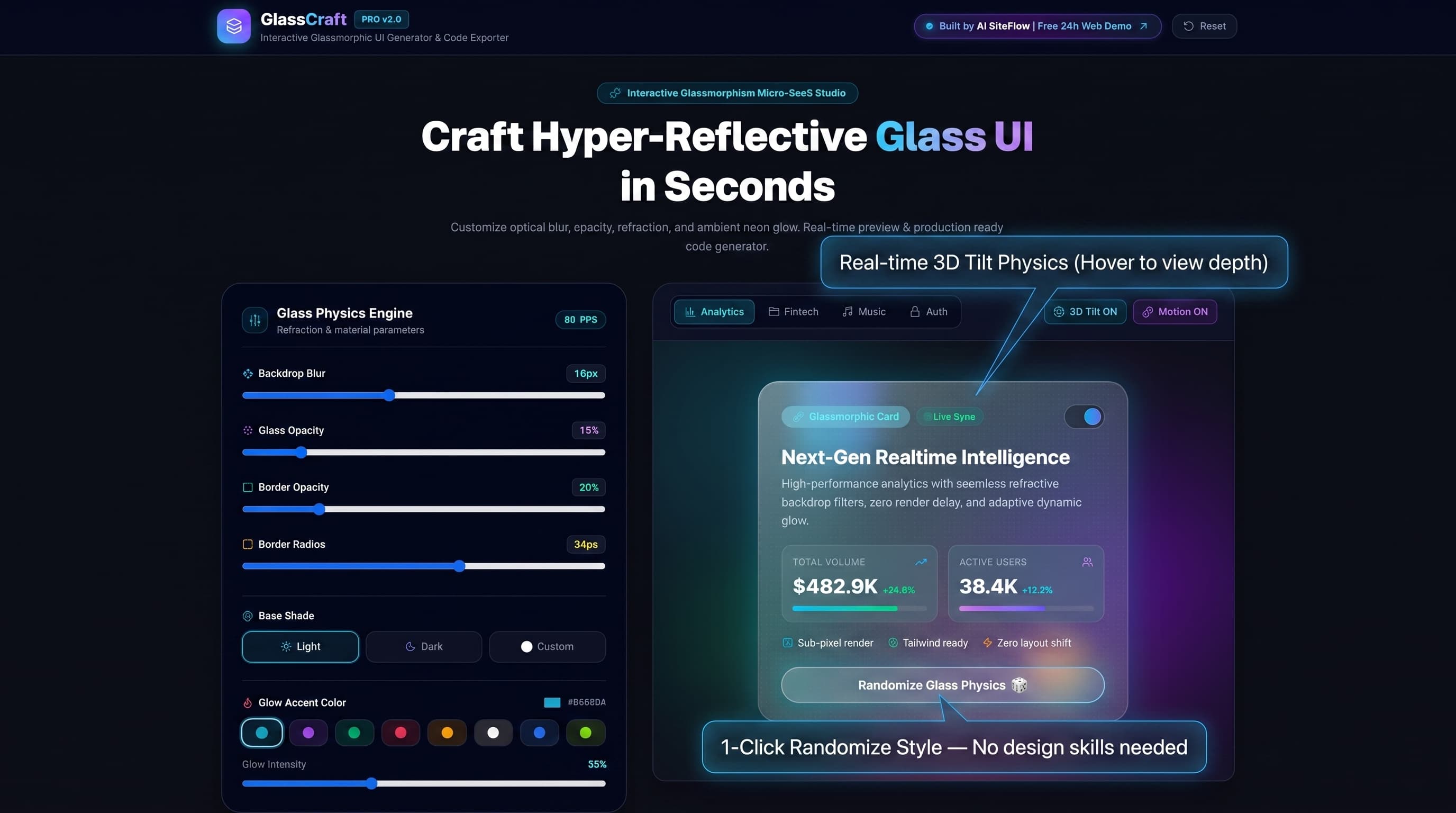
Figure 2: The central interactive canvas featuring dynamic 3D perspective tilt physics and instant style synchronization.
Hardware-Accelerated 3D Tilt Physics
Moving your mouse cursor across the card triggers real-time 3D rotation (perspective: 1000px). This allows you to inspect how ambient light refractions and edge highlights respond to motion — mimicking real glass refraction.
Preset Layout Switcher
Tabs at the top of the canvas let you switch between Analytics (data metrics & trend indicators), Fintech (platinum glass credit cards), Music Player (album art & waveform), and Auth Modal (frosted sign-in forms) — all rendering live.
1-Click Randomize Glass Physics
A 3D glowing button beneath the preview generates instant, randomized combinations of blur, opacity, border strength, and neon glow colors — an instant inspiration engine for designers suffering from creative block.
The Glass Physics Engine — Deep Customization Controls
Granular real-time sliders for every optical parameter
Creating realistic glass requires fine-tuning optical parameters. GlassCraft consolidates these complex variables into intuitive, real-time slider controls.
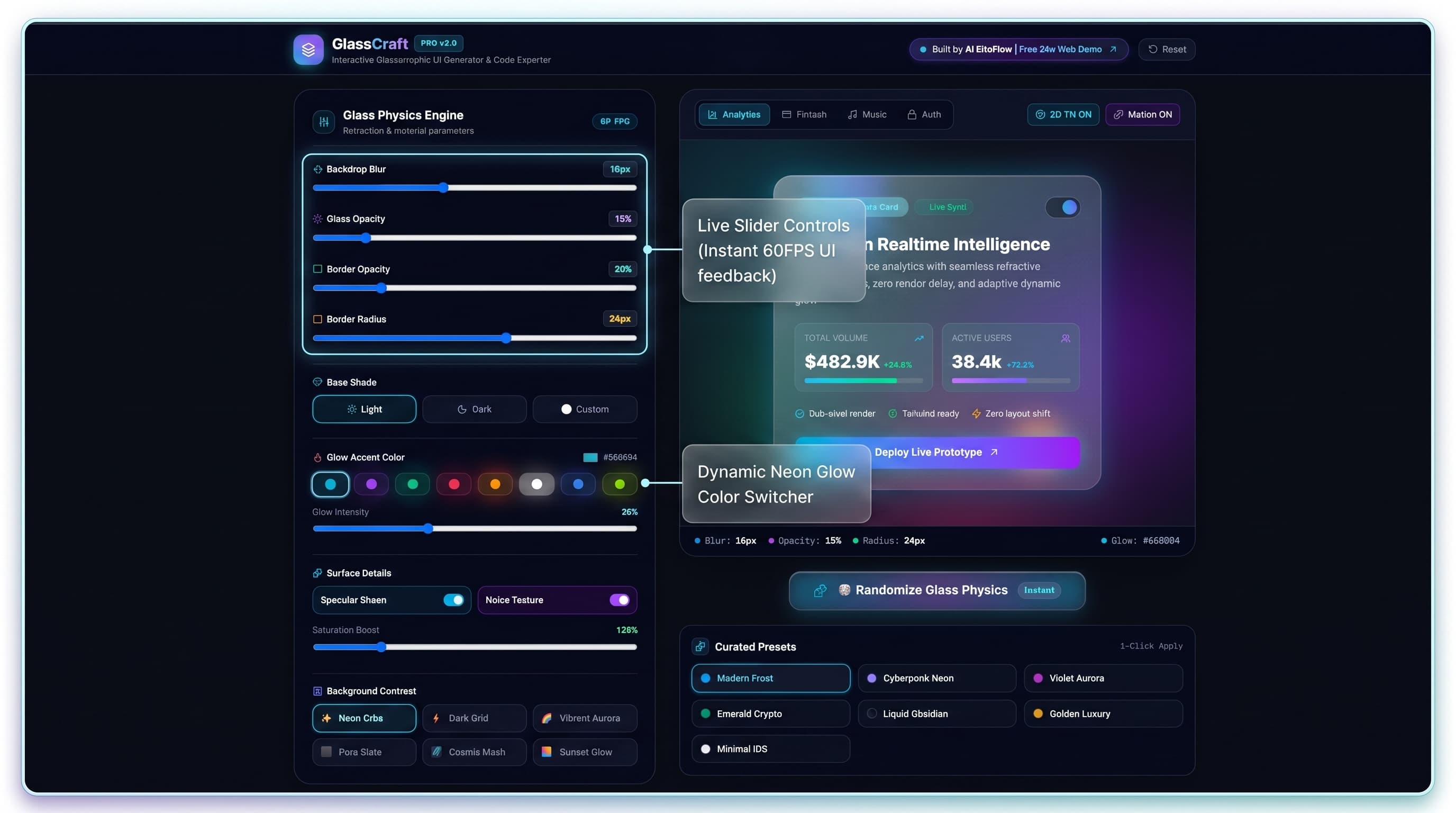
Figure 3: The left-hand Glass Physics Engine control panel with real-time sliders and neon color accent pickers.
Backdrop Blur
0px → 40pxControls backdrop-filter blur strength. Lower = crisp transparent glass. Higher = deep frosted crystal.
Glass Fill Opacity
0% → 100%Adjusts the surface transparency of the base container fill color.
Border Opacity & Radius
0px → 48pxSharpness of container corners and transparency of container borders.
Base Shade
Light / Dark / CustomToggle between Apple-style light frosted glass, obsidian dark glass, or custom color-tinted refraction.
Glow Accent Color
6 Neon PresetsElectric Cyan, Neon Violet, Matrix Emerald, Ruby Crimson, Golden Amber, or Pure White ambient back-shadows.
Specular Sheen
Toggle On/OffAdds a diagonal light reflection highlight across the glass surface for hyper-realistic depth.
Frosted Noise Texture
Toggle On/OffEmbeds a subtle frosted grain layer (8×8px radial dot grid) for tactile, material appeal.
Production-Ready 1-Click Code Export
Tailwind CSS, Raw CSS, and React TSX — ready to paste
Visual design is only half the battle. GlassCraft eliminates manual CSS drafting by automatically formatting your custom design into production-ready code blocks across three tailored export formats.
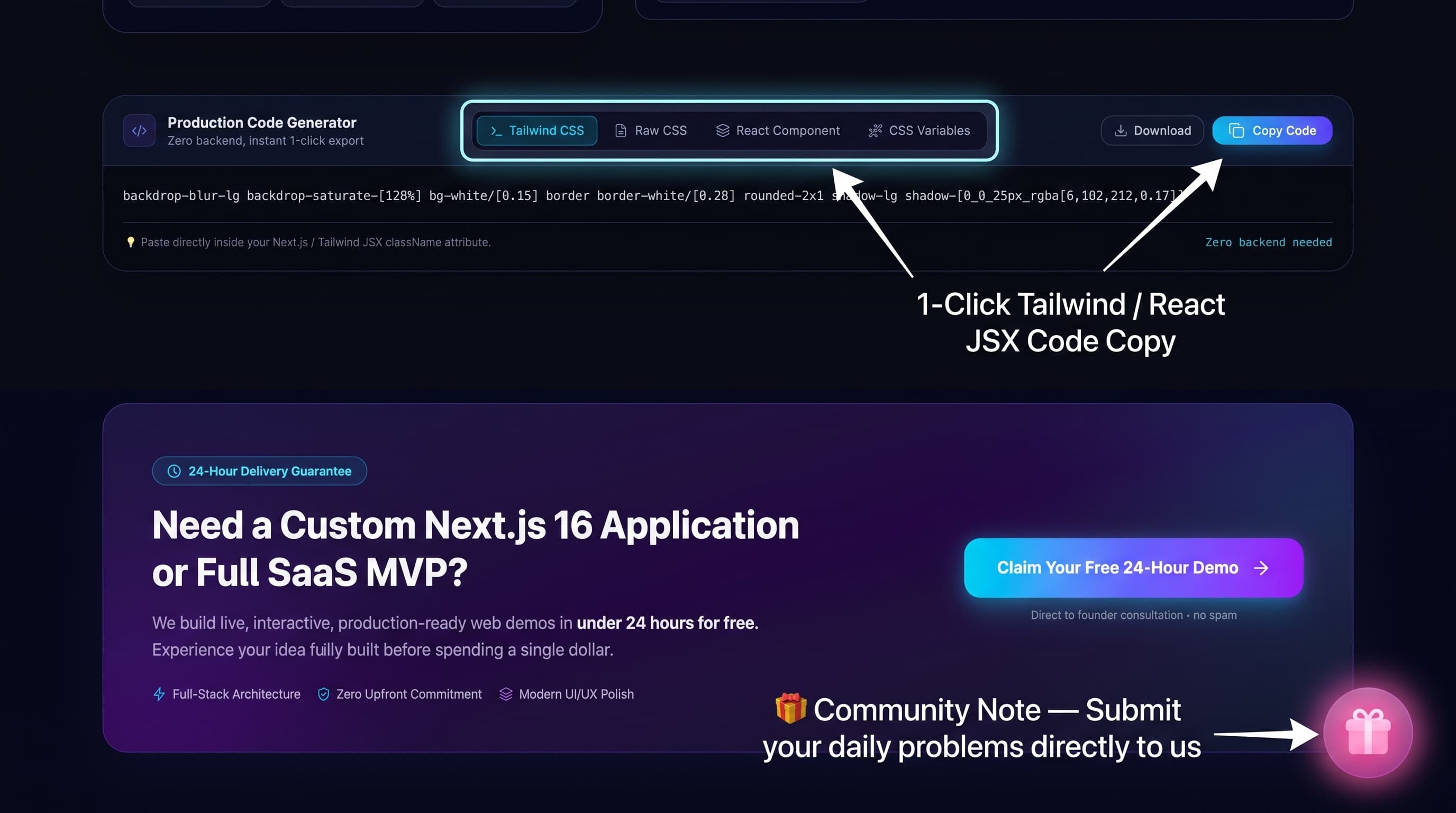
Figure 4: Code export tabs with 1-click clipboard copy, alongside the interactive Community Gift Note.
Tailwind CSS
Pre-formatted utility classes — paste directly into your Next.js JSX/TSX with zero modification.
Raw CSS
Standard CSS rules with backdrop-filter, -webkit prefix, border, border-radius, and multi-layer box-shadow.
React Component
A clean, reusable <GlassCard /> TypeScript component with specular overlay divs and inline style props.
The Philosophy Behind GlassCraft
GlassCraft was not created as a bloated commercial SaaS with paywalls or subscription tiers. It was engineered by AI SiteFlow as a 100% free community utility to solve a real, daily developer pain point.
The Community Gift Note
“I built GlassCraft completely free because I noticed how tedious and repetitive hand-crafting glassmorphism CSS can be for developers every single day. My goal is to eliminate these daily friction points for creators worldwide.
If you face any other annoying, repetitive web development or design challenges, please share your problem with us!
- • If it costs $0 in infrastructure: We will build and release the tool 100% free for everyone.
- • If it requires server infrastructure: We will keep it at a minimal, transparent price.
Have a problem or app idea in mind? Email us directly at build@aisiteflow.agency”
Step-by-Step Tutorial: 30-Second Next.js 16 Integration
Design Your Glass Surface on GlassCraft
Navigate to aisiteflow.agency/tools/glasscraft. Click 'Randomize Glass Physics' until you find an aesthetic you like, or manually adjust the Backdrop Blur slider to 20px and Glass Opacity to 15%. Select Electric Cyan as your Glow Accent Color.
Copy the Generated Tailwind CSS Code
Click the 'Copy Tailwind CSS' button on the code export panel. Your clipboard now holds clean utility classes ready to paste — no cleanup or reformatting required.
Paste into Your Next.js Component
Create a new component file src/components/GlassFeatureCard.tsx and paste the exported code. That is all — you now have a production-ready glassmorphic card with zero third-party CSS dependencies.
import React from 'react';
import { Sparkles, ArrowUpRight } from 'lucide-react';

export default function GlassFeatureCard() {
  return (
    <div className="relative overflow-hidden transition-all duration-300
      backdrop-blur-md bg-slate-950/50 border border-cyan-500/30
      rounded-[29px] p-8 shadow-[0_25px_50px_-12px_rgba(0,0,0,0.45),
      0_0_30px_rgba(6,182,212,0.2)]
      hover:border-cyan-400/60">

      {/* Specular Highlight Overlay */}
      <div className="pointer-events-none absolute -inset-px
        bg-gradient-to-br from-white/20 via-transparent
        to-transparent opacity-60" />

      {/* Card Header */}
      <div className="flex items-center justify-between mb-6">
        <span className="inline-flex items-center gap-1.5 px-3 py-1
          rounded-full text-xs font-semibold bg-cyan-500/10
          text-cyan-400 border border-cyan-500/20">
          <Sparkles className="w-3.5 h-3.5" />
          Next-Gen Interface
        </span>
        <button className="p-2 rounded-full bg-white/5
          hover:bg-white/10 text-white transition-colors">
          <ArrowUpRight className="w-4 h-4" />
        </button>
      </div>

      {/* Content */}
      <h3 className="text-2xl font-bold text-slate-900 dark:text-white mb-2">
        Hyper-Reflective Glass Surface
      </h3>
      <p className="text-slate-600 dark:text-slate-400 text-sm leading-relaxed mb-6">
        Engineered with sub-pixel hardware acceleration and zero
        layout shift.
      </p>

      {/* CTA */}
      <button className="w-full py-3 rounded-xl bg-gradient-to-r
        from-cyan-500 to-blue-600 text-white font-semibold
        shadow-lg shadow-cyan-500/25 hover:shadow-cyan-500/40
        transition-all">
        Deploy Component
      </button>
    </div>
  );
}
Conclusion & Summary
Glassmorphism no longer has to be a time-consuming trial-and-error process. With GlassCraft, developers and UI/UX engineers possess a free, powerful visual sandbox to design, preview, and export high-performance Glassmorphism UI tokens instantly.
Zero Cost & Zero Setup
No API keys, no sign-ups, and no installation required.
60FPS Real-Time Feedback
Instant visual updates with dynamic 3D perspective tilt physics.
1-Click Code Generation
Export clean Tailwind CSS, raw CSS, or React TSX components.
Built for Developers
Created by AI SiteFlow to solve daily frontend design friction.
Ready to Level Up Your UI Workflow?
Launch GlassCraft for free and start crafting hyper-reflective glass surfaces in seconds — no sign-up required.